
When I first started working with automation tools during my internship, Gumloop looked exciting because it promised AI-powered workflows, web scraping, and automation without writing code. But once you actually start using it, especially as a beginner, you realize it is not always the easiest or most flexible option for every use case. Some features feel limited, pricing can become confusing, and certain workflows are harder to scale for real business needs.
In 2025, more teams are actively searching for Gumloop alternatives because businesses now need reliable workflow automation software that works across marketing, operations, sales, and data teams. The demand for no-code automation tools has grown rapidly, especially among startups and small businesses that want fast results without hiring developers.
If you are evaluating Gumloop competitors or simply want a better automation platform for your needs, this guide will help. I will walk you through the 10 best Gumloop alternatives, based on real-world usability, features, pricing clarity, and beginner friendliness. I will also share honest insights from using some of these tools during internships and early projects, so you can avoid common mistakes and pick the right platform confidently.
Table of Contents
What Is Gumloop and Why Look for Alternatives?
Gumloop is an AI-powered automation platform focused on workflow creation, web scraping, and data extraction using visual logic blocks. It appeals to non-technical users who want automation without coding, especially for research-heavy or data-driven workflows.
However, many users start looking for alternatives to Gumloop because:
- The learning curve is higher than expected for beginners
- Pricing increases quickly as usage grows
- Limited integrations compared to mature automation platforms
- Not ideal for complex business automation beyond scraping
That is why many people now prefer no-code automation platforms like Make, Zapier, or n8n, which offer better flexibility, integrations, and scalability.
Why No-Code Automation Tools Matter More Than Ever
In 2025, automation is no longer optional. Businesses want tools that help them automate workflows without coding, connect multiple SaaS apps, and reduce manual work. Whether you are a freelancer, startup founder, or operations manager, choosing the best automation platform directly impacts productivity.
The right Gumloop alternative should offer:
- Visual workflow builders
- Strong integrations
- AI-powered automation where needed
- Transparent pricing
- Scalability for real business use
Comparison Table: Best Gumloop Alternatives in 2025
| Tool | Pricing | Best For | Key Feature |
|---|---|---|---|
| Make | Free, Paid from $9 | Advanced workflows | Visual automation builder |
| Zapier | Free, Paid from $19 | Simple automation | App integrations |
| n8n | Free, Paid | Developers and teams | Open-source workflows |
| Activepieces | Free, Paid | Budget users | Open-source automation |
| Relay.app | Free, Paid | AI workflows | AI agents and logic |
| Peltarion | Custom | AI pipelines | ML workflow automation |
| Workato | Enterprise pricing | Large teams | Enterprise automation |
| Parabola | Paid | Data automation | Spreadsheet-style flows |
| Bardeen | Free, Paid | Browser automation | Chrome automation |
| Lindy | Paid | AI assistants | AI task execution |
10 Best Gumloop Alternatives
1. Make (formerly Integromat)
Website: https://www.make.com

Overview:
Make is one of the strongest Gumloop alternatives if you want serious workflow automation software. I personally recommend this tool to anyone who wants flexibility without coding. During my internship, once I learned Make, I realized how limited Gumloop felt for multi-step business workflows. Make allows you to build complex logic visually and connect hundreds of apps easily.
Key Features:
- Visual drag-and-drop workflow builder
- Advanced conditional logic
- API and webhook support
- Strong SaaS integrations
Best For: Startups, marketers, operations teams
Pros & Cons:
| Pros | Cons |
|---|---|
| Extremely flexible workflows | Interface can feel complex at first |
| Affordable pricing | Takes time to master |
| Strong community support | Overkill for very simple tasks |
2. Zapier
Website: https://www.zapier.com
Overview:
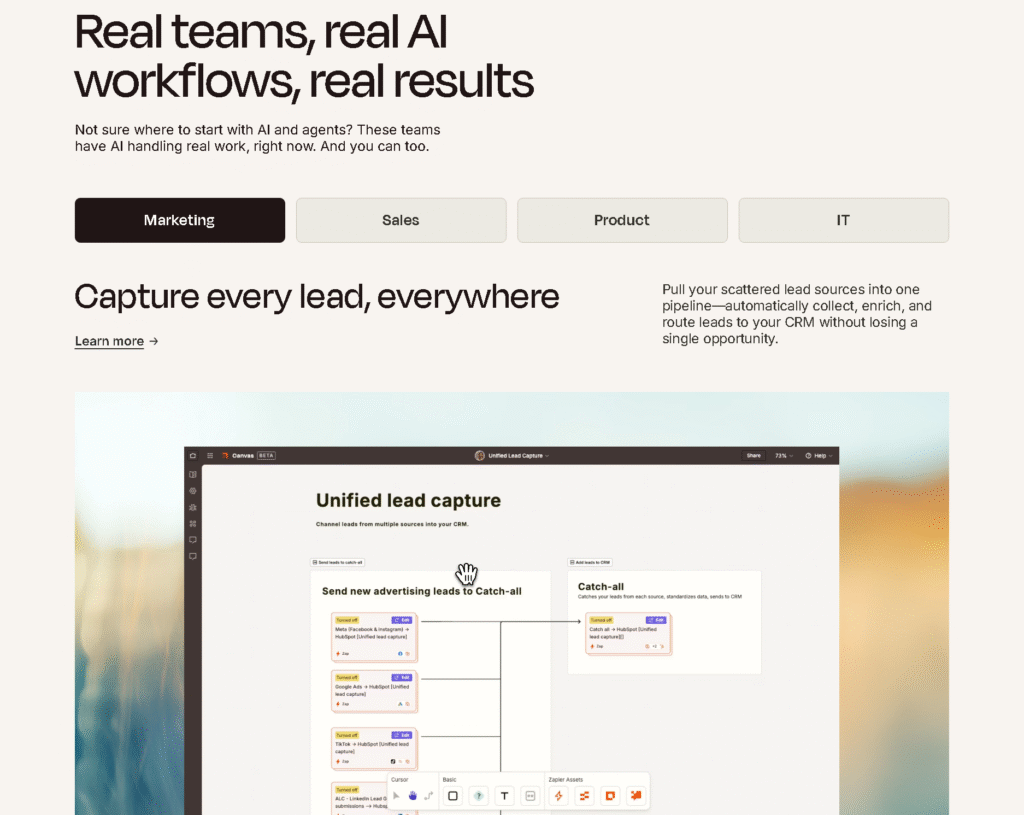
Zapier is often the first automation tool beginners try, and for good reason. It is much easier to start with compared to Gumloop. I usually suggest Zapier if you are new and want quick automation without deep logic. However, it becomes expensive fast.
Key Features:
- Thousands of app integrations
- Simple trigger-action workflows
- Reliable automation
Best For: Beginners, small teams
Pros & Cons:
| Pros | Cons |
|---|---|
| Very easy to use | Expensive at scale |
| Huge integration library | Limited complex logic |
| Fast setup | Less customization |
3. n8n
Website: https://www.n8n.io
Overview:
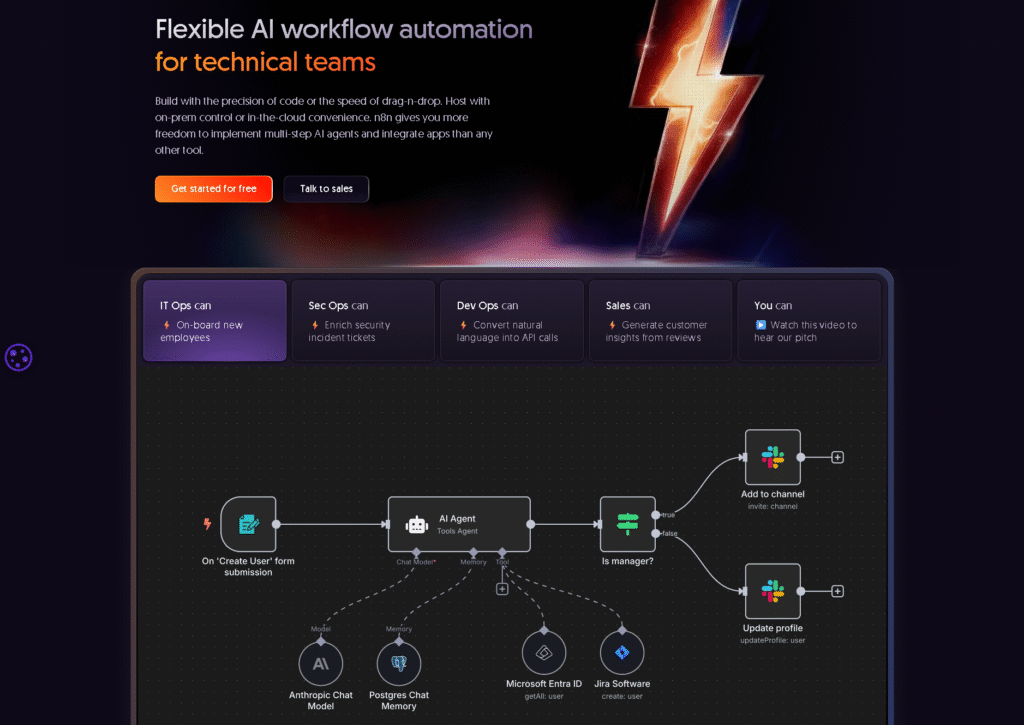
n8n is an open-source Gumloop alternative that gives you full control. If you are comfortable learning a bit of logic, n8n is powerful. I have seen teams switch from Gumloop to n8n because it offers freedom without usage-based pricing pressure.
Key Features:
- Open-source automation
- Self-hosting option
- Advanced logic and APIs
Best For: Technical teams, developers
Pros & Cons:
| Pros | Cons |
|---|---|
| No vendor lock-in | Steeper learning curve |
| Highly customizable | Needs setup |
| Cost-effective | Not beginner friendly |
4. Activepieces
Website: https://www.activepieces.com

Overview:
Activepieces is one of the easiest open-source Gumloop competitors. If you want a free Gumloop alternative with modern UI, this is worth trying. I often recommend this to students or early-stage founders.
Key Features:
- No-code automation
- Open-source
- Simple workflows
Best For: Budget users, beginners
Pros & Cons:
| Pros | Cons |
|---|---|
| Free core features | Smaller integration library |
| Clean UI | Less advanced logic |
| Easy onboarding | Growing ecosystem |
5. Relay.app
Website: https://www.relay.app

Overview:
Relay.app is a newer tool focused on AI-driven workflows. If you liked Gumloop for its AI approach, Relay is a strong alternative. I suggest you try Relay if your automation depends on AI agents and decision-making rather than simple triggers.
Key Features:
- AI workflow agents
- Conditional logic
- Clean interface
Best For: AI-first automation
Pros & Cons:
| Pros | Cons |
|---|---|
| Strong AI focus | Fewer integrations |
| Easy logic setup | Newer platform |
| Modern UX | Pricing still evolving |
6. Peltarion
Website: https://www.peltarion.com
Overview:
Peltarion is an advanced platform designed for building and deploying AI-powered workflows and machine learning models. This is more sophisticated than typical no-code automation tools. If you are diving into real AI automation pipelines beyond simple integration tasks, this is a strong choice. I suggest exploring this only if your project really needs deep AI workflows.
Key Features:
- AI/ML workflow builder
- Visual model design
- Collaboration tools
- Deployment and monitoring
Best For: AI teams, data scientists, enterprise workflows
Pros & Cons:
| Pros | Cons |
|---|---|
| Strong AI and ML capabilities | Steep learning curve |
| Designed for advanced workflows | Not ideal for simple automation |
| Visual model design | Expensive for smaller teams |
| Good for enterprise use | Requires some technical background |
7. Workato
Website: https://www.workato.com
Overview:
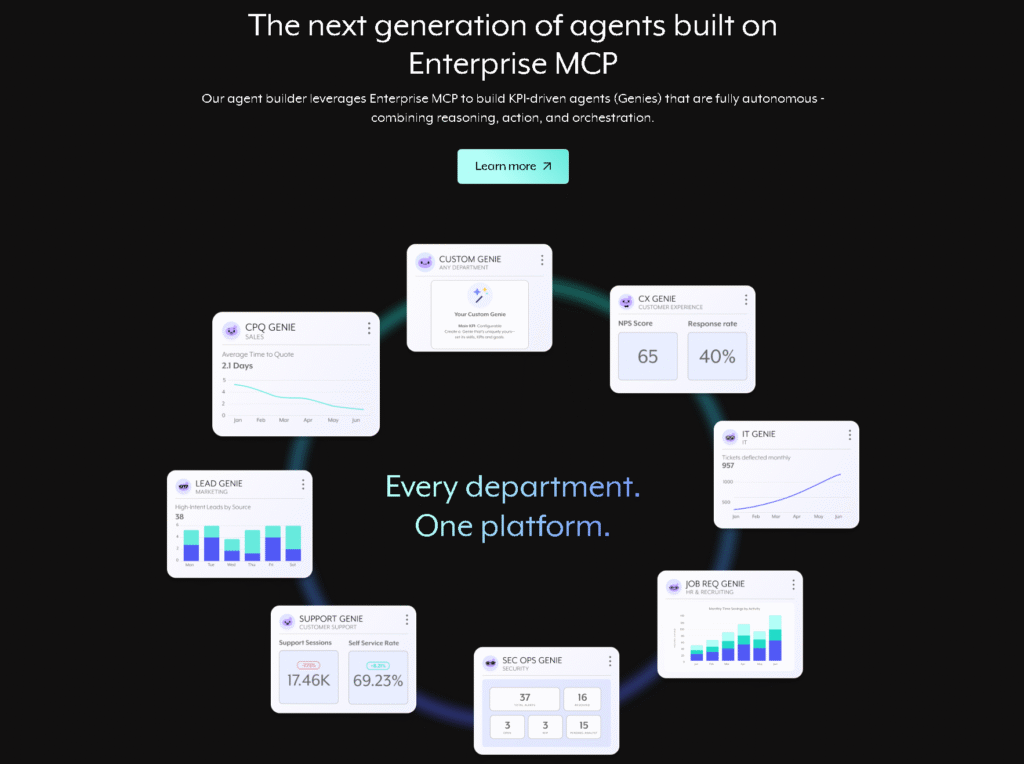
Workato is a true enterprise-grade automation platform. It shines when you need complex integrations, high reliability, and cross-team automation at scale. I recommend Workato when your operations have advanced needs that go beyond basic triggers and actions, especially for large companies.
Key Features:
- Enterprise automation
- API orchestration
- Secure workflows
- Team-wide governance
Best For: Large companies, enterprise teams
Pros & Cons:
| Pros | Cons |
|---|---|
| Excellent for enterprise-scale automation | Very high cost |
| Strong governance and security | Overkill for small teams |
| Broad integrations and stability | Not beginner-friendly |
| Powerful workflow logic | Requires training |
8. Parabola
Website: https://www.parabola.io
Overview:
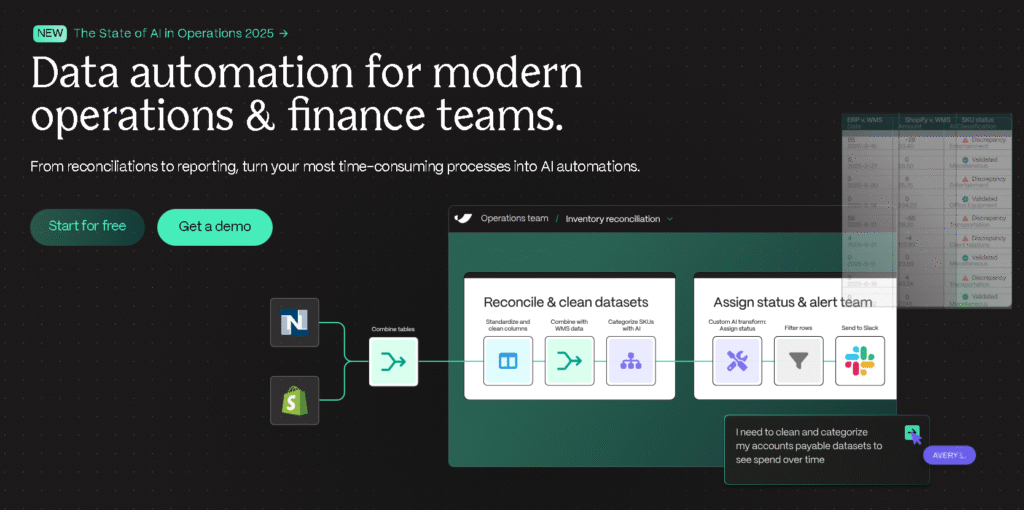
Parabola is focused on workflow automation for data processing. If your main goal is transforming, cleaning, and automating data tasks (like data pipelines), Parabola makes it visual and easier than code. I’d suggest this if your Gumloop usage was heavy on data manipulation.
Key Features:
- Spreadsheet-style workflow builder
- Data transformation
- API connectors
- Scheduled runs
Best For: Data teams, analysts, operations
Pros & Cons:
| Pros | Cons |
|---|---|
| Great for complex data workflows | Not ideal for simple app automation |
| Easy visual builder for data | Limited non-data integrations |
| Good for ETL tasks | Pricing increases with data use |
| Scheduled automation | Not beginner-first |
9. Bardeen
Website: https://www.bardeen.ai

Overview:
Bardeen focuses on browser automation. It is quite useful when your tasks involve web apps with no API or routine browser actions. I suggest this if a lot of your automation is manual work inside a browser.
Key Features:
- Chrome automation
- Web scraping triggers
- Browser logic actions
- Pre-built recipes
Best For: Browser-heavy workflows, web automation
Pros & Cons:
| Pros | Cons |
|---|---|
| Excellent for browser tasks | Limited non-browser workflows |
| Quick setup | Less powerful as general automation |
| Useful for small workflows | Fewer deep integrations |
| Works with web apps easily | Not ideal for enterprise |
10. Lindy
Website: https://www.lindy.ai

Overview:
Lindy is an AI assistant tool that executes tasks by interpreting natural language. It’s promising if your workflow automation leans heavily on AI actions rather than structured logic flows. I recommend Lindy if your goal is AI-first task execution where typing language commands triggers actions.
Key Features:
- AI-driven task execution
- Natural language workflow design
- Integrations through AI commands
- Lightweight automation
Best For: AI-native automation, creative workflows
Pros & Cons:
| Pros | Cons |
|---|---|
| Strong AI task focus | Newer tool with smaller ecosystem |
| Natural language interface | Limited advanced logic |
| Easy for simple AI commands | Not a full workflow builder |
| Fast for quick tasks | Pricing unknown/varies |
How to Choose the Best Gumloop Alternatives
Before switching, ask yourself:
- Do I need AI workflows or business automation
- Is pricing predictable
- Do I need web scraping or integrations
- Am I a beginner or advanced user
For beginners, I honestly suggest Zapier or Activepieces.
For serious automation, Make or n8n are better long-term.
And for AI-first workflows, Relay.app or Lindy are worth trying.
Check out more at tooljunction, we share honest AI tool reviews and tutorials to help you choose the right tools for your creative projects.
FAQs
1. Which is the best Gumloop alternative for small businesses?
Make and Zapier are the best automation tools for small businesses because they balance usability, pricing, and integrations.
2. Is there a free Gumloop alternative?
Yes. Activepieces and n8n offer strong free options.
3. Which tool is easiest for beginners?
Zapier is the easiest to start with, no doubt.
4. Can I replace Gumloop completely?
Yes. Most teams eventually outgrow Gumloop and move to more flexible platforms.
Conclusion
Choosing the right Gumloop alternative depends on how serious your automation needs are. Gumloop is a good starting point, but in real projects and internships, I have seen teams switch quickly once workflows become complex. Tools like Make, n8n, and Relay.app offer better scalability and flexibility in 2025.
If you are just starting, try beginner-friendly tools first. If you want long-term automation, invest time in learning a stronger platform. You should experiment, test free plans, and choose what fits your workflow best.
If you want more honest reviews like this, explore our other guides on workflow automation software and no-code automation tools.
ToolJunction simplifies AI adoption for businesses and creators. We provide trusted reviews and practical tutorials to help you select and apply the right tools for growth and productivity.
![ToolJunction.io branding used on the [10 Best Gumloop Alternatives in 2025] complete guide and tools comparison.](https://blog.tooljunction.io/wp-content/uploads/2025/09/tooljunction-1-1.webp)